Chrome extension · Manifest V3 · v3.4 · 100% local
Your browser
has a curfew.
CLOCTIME closes the tab on the sites that eat your afternoon, kills YouTube Shorts, runs strict Pomodoro sessions you can't quit early, and keeps a pixel buddy on your screen who notices when you wander.
- Store Rating
- 4.9★
- People focused
- 155+
- Data sent
- 0kb
- Price, forever
- Free
Strict Pomodoro Engine
Sessions you cannot quit early. Pin your single focus task to the clock and lock out settings until the bell rings.
Clean YouTube & Site Wall
Hides addictive Shorts, strips sidebar recommendations, and replaces blacklisted domains with a calm mindful reflection screen.
Interactive Pixel Buddy
An animated companion reacts to your focus streaks, celebrates completions, and prompts you to lock in. Call with Ctrl+Shift+M.
100% Private · Stored Locally
No accounts, no tracking scripts, no cloud servers. All timers, heatmaps, and stats stay securely inside your browser.
You don't lose afternoons all at once.
You lose them five minutes at a time, to a feed that is very good at asking for one more. Here's how a normal afternoon quietly disappears.
See how the blocker works| Time | What happened | Cost |
|---|---|---|
| 14:02 | “One video before I start.” | 5m |
| 14:07 | “The sidebar has another idea.” | 34m |
| 14:41 | “One more, then work. Promise.” | 1h 12m |
| 15:53 | “Look up. The light's changed.” | 1h 51m |
| Afternoon total | 3h 42m | |
The feed is engineered to win the next minute. CLOCTIME is engineered to make that minute harder to spend.
A control surface,
not a dashboard.
Everything lives in one small panel in your toolbar. No charts to interpret, no streaks to maintain, no new app to remember. Open it, start the clock, get on with your day.
 CLOCTIMEFocus cockpit 25 / 5
Learn system design
CLOCTIMEFocus cockpit Locked CLOCTIME intervention
Distraction
blocked.
You added this site to your list. It's doing its job.
youtube.com/watch?v=…
Blocked locally. Nothing left your device.
CLOCTIMEFocus cockpit 6 themes Make the cockpit yours.
Themes change the surface. The rules stay the rules.
CLOCTIMEFocus cockpit Local 12h 20m
Focused time, Monday to today
- Current streak
- 6 days
- Completed sessions
- 24
- Requests to a server
- 0
Preview built from the extension's own interface. The real one sits in your toolbar.
Three steps.
Then quiet.
Setup takes about ten minutes. You only have to be honest once, about which sites actually get you.
-
Step 01
Install it
Add CLOCTIME from the Chrome Web Store. Free, no account, no onboarding tour.
Chrome desktop Free · v3.4 · Manifest V3Open the Chrome Web Store -
Step 02
Set the rules
Add the sites that reliably eat your day. Twenty is plenty. You can change the list later — you just can't argue with it mid-session.
- youtube.comBlocked
- x.comBlocked
- reddit.comBlocked
- instagram.comBlocked
-
Step 03
Lock in
Pick a task, set the clock, and start. During a strict session, the controls go away. That's the point.
25:00 Strict focus Controls lockedMeet the buddy who watches
He's not a mascot.
He's a witness.
The focus buddy lives in your browser and reacts to the work: happy while you focus, dancing when a session ends, and very quiet when you wander off. A small, orange accountability partner.
Try a mood.
Six reactions, tied to what you're actually doing. Pick one and watch him change his mind.
Six moods. He has opinions.
From the Chrome Web Store.
Unedited reviews from people who installed it.
4.9 average · 155+ people
“Very useful and it has increased my focus time. I use it for pomodoro focus work and studying. Simple and that is what makes it so useful. I would recommend it for everyone.”
“i love it! the ui is clean and the functionality is great :”) feels so premium! thank you for this!”
“A really handy browser extension with cool features and a sleek design. Configured my blocked domains once and it's excellent.”
Nothing leaves
this machine.
No tracking, no accounts, no servers to trust. Your sessions, streaks, and blocklists live in Chrome's local storage — and disappear when you uninstall.
Fully auditable code
At a glance
| Memory footprint | Negligible |
|---|---|
| Servers contacted | 0 |
| Account required | None |
| Data storage | Local only |
| Built-in themes | 6 |
| Running cost | Free forever |
No analytics. No tracking scripts. No remote code.
What it asks for
| Storage | Saves timers, streaks, and domain lists privately on your device. |
|---|---|
| Alarms | Keeps the focus clock accurate without draining the battery. |
| Tabs & scripting | Enforces your block rules and puts the buddy on the pages you allow. |
| declarativeNetRequest | Stops distracting domains before they load, without reading your history. |
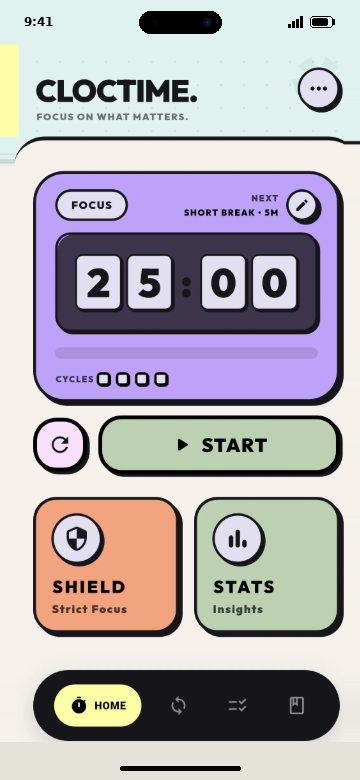
iOS + Android · beta build · v3.4
Pocket edition
The same quiet,
in your pocket.
A mobile build is in testing for iOS and Android. Same timer, same blocklists, same opinionated pixel buddy — sized for the screen you actually pick up without thinking.
Get the beta
Limited spotsJoin the early testing list. We'll send a build when your platform is ready.
Apply for beta accessGive the feed
a rest.
Free forever. No account. Nothing sent to a server.